




통합검색
'packing'검색에 대한 결과입니다.

맞춤제작 전문가 답변    검색결과 4,774건

  • 이벤트신청


    ng>1.업종 : 건설업ng>
     

    ng>2.예산 : ng>
     

    ng>3.제작 요청사항ng>
     

    ng>1)업무흐름 및 기존 업무방식ng>
    - 매일 작업자와 장비사용,현장명,당일사용금액 등 작성합니다.

    ng style="font-size: 11pt;">2)자동화하고 싶은 업무ng>
    pan style="font-size: 11pt;"> * 시트1-작업일보 / 시트2-작성목록 / 시트3-월별 작업자 현황 / 시트4-월별 장비사용내역pan>
    pan style="font-size: 11pt;"> * pan>pan style="font-size: 14.6667px;">시트1. 작업일보pan>

    pan style="font-size: 14.6667px;">-작성일자,당일사용금액,일보저장버튼(시트2.작성목록으로저장),PDF저장버튼pan>

    pan style="font-size: 14.6667px;">-상단에 현장명작성pan>

    pan style="font-size: 14.6667px;">-작업자,공정,오전작업,오후작업,장비사용내역 작성pan>

    pan style="font-size: 11pt;"> * pan>pan style="font-size: 14.6667px;">시트2. 작성목록pan>

    pan style="font-size: 14.6667px;">-시트1에서 저장한 작업일보 나타내기pan>

    pan style="font-size: 14.6667px;">-일자별로 자동 정렬pan>

    pan style="font-size: 14.6667px;">-수정,삭제 버튼pan>

    pan style="font-size: 14.6667px;">* 시트3. 월별 작업자현황pan>

    pan style="font-size: 14.6667px;">-시트1에서 작성한 날짜에 작업자 이름별 일수,단가,합계 나타내기pan>

    pan style="font-size: 14.6667px;">-월별 공휴일(빨간날) 자동 색변경pan>

    pan style="font-size: 14.6667px;">* 시트4. 월별 장비사용내역pan>

    pan style="font-size: 14.6667px;">-시트1에서 작성한 날짜에 장비 집계pan>

    pan style="font-size: 14.6667px;">-월별 공휴일(빨간날) 자동 색변경pan>

  • 관리비 고지서양식 문의해요.

    첨부파일에 있는 양식처럼 비슷하게 하고 싶습니다ng=EN-US style="FONT-FAMILY: 함초롬바탕; LETTER-SPACING: 0pt; mso-font-width: 100%; mso-text-raise: 0.0pt">.

    전체적인 색는 연두색이 아닌 하늘색계통으로 하고 싶구요

    세로방향으로 제작 해주시고 첨부파일에 있는 관리비부과내역 내용는 없이 해주세요ng=EN-US style="FONT-FAMILY: 함초롬바탕; LETTER-SPACING: 0pt; mso-font-width: 100%; mso-text-raise: 0.0pt">.

    청소비ng=EN-US style="FONT-FAMILY: 함초롬바탕; LETTER-SPACING: 0pt; mso-font-width: 100%; mso-text-raise: 0.0pt">,세대전기료ng=EN-US style="FONT-FAMILY: 함초롬바탕; LETTER-SPACING: 0pt; mso-font-width: 100%; mso-text-raise: 0.0pt">,승강기유지비ng=EN-US style="FONT-FAMILY: 함초롬바탕; LETTER-SPACING: 0pt; mso-font-width: 100%; mso-text-raise: 0.0pt">,정화료ng=EN-US style="FONT-FAMILY: 함초롬바탕; LETTER-SPACING: 0pt; mso-font-width: 100%; mso-text-raise: 0.0pt">,음식물쓰레기ng=EN-US style="FONT-FAMILY: 함초롬바탕; LETTER-SPACING: 0pt; mso-font-width: 100%; mso-text-raise: 0.0pt">,수급자감면ng=EN-US style="FONT-FAMILY: 함초롬바탕; LETTER-SPACING: 0pt; mso-font-width: 100%; mso-text-raise: 0.0pt">,상하수도요금

    공용전기료 ng=EN-US style="FONT-FAMILY: 함초롬바탕; LETTER-SPACING: 0pt; mso-font-width: 100%; mso-text-raise: 0.0pt">( 2ng=EN-US style="FONT-FAMILY: 함초롬바탕; LETTER-SPACING: 0pt; mso-font-width: 100%; mso-text-raise: 0.0pt">2가구 ng=EN-US style="FONT-FAMILY: 함초롬바탕; LETTER-SPACING: 0pt; mso-font-width: 100%; mso-text-raise: 0.0pt">25%, 3ng=EN-US style="FONT-FAMILY: 함초롬바탕; LETTER-SPACING: 0pt; mso-font-width: 100%; mso-text-raise: 0.0pt">2가구 ng=EN-US style="FONT-FAMILY: 함초롬바탕; LETTER-SPACING: 0pt; mso-font-width: 100%; mso-text-raise: 0.0pt">35%, 4ng=EN-US style="FONT-FAMILY: 함초롬바탕; LETTER-SPACING: 0pt; mso-font-width: 100%; mso-text-raise: 0.0pt">2가구 ng=EN-US style="FONT-FAMILY: 함초롬바탕; LETTER-SPACING: 0pt; mso-font-width: 100%; mso-text-raise: 0.0pt">40% 계산ng=EN-US style="FONT-FAMILY: 함초롬바탕; LETTER-SPACING: 0pt; mso-font-width: 100%; mso-text-raise: 0.0pt">)

    의뢰하면 가격이 얼마정도 되나요ng=EN-US style="FONT-FAMILY: 함초롬바탕; LETTER-SPACING: 0pt; mso-font-width: 100%; mso-text-raise: 0.0pt">?

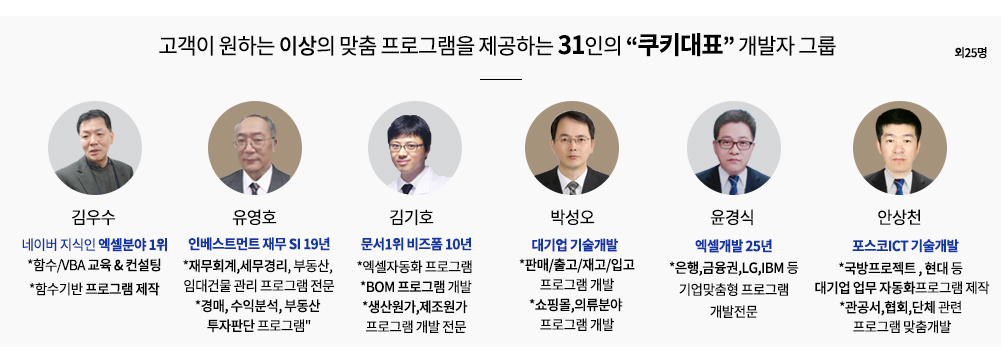
업무자동화 맞춤제작

고객님의 상황에 100% 맞춘 콘텐츠 제작 전문 서비스를 이용해 보세요.
프리미엄 무료 이벤트 중